

Five customers cancelled last month.
The first never really started. The second used the product a little less every week. The third kept logging in, but only for one thing. The fourth opened six support tickets in three months. The fifth used the product exactly as always, right up to the renewal invoice.
In the churn report, they are five identical lines.
In the data, they are five different stories, and every one of them was visible weeks before the cancel button.
No. 1 was about when customers leave. This one is about how: five of the most common roads customers take on the way out, and how to spot each one in time to do something.
The short version. Churn warning signs are changes in a customer’s behavior that come before a cancellation. They aren’t a single signal. Customers leave by different roads. Five of the most common are Never started, Fading, Narrowing, Frustrated and Active until renewal, and each one has its own signs and its own fix. A sign only counts if it is far more common among customers who cancel than among customers who stay, so you check that first, then act on the customers you still have.
Why one health score misses most churn warning signs
Most teams that try to find at-risk customers start with one number: a health score, or a rule like “fewer than five logins last month”.
One number blends very different customers. Someone who never got started and someone who uses the product daily but doubts the price will both show up as “at risk”. They need different interventions from different teams: the first one needs the product team to fix the path to the first result, the second needs the customer success team to show the value before the invoice arrives. And the fifth customer above wouldn’t be flagged at all: their usage never dropped, right up to the renewal.
Churn is where the story ends, not where it starts.
Before the cancel, something changed in what the customer did or in what they got from the product. The road is the shape of that change.
First, track the lifecycle, not just the subscription
Most billing data tells you three things: who subscribed, what they pay, and when they cancelled.
Customer 123 → active → cancelled.
That’s enough to count churn. It isn’t enough to see a road. For that, you need to know what the customer did in between. Every product tracks different things, but these are some of the most common groups of events:
Acquisition: source, campaign, landing page, signup.
Activation: account created, onboarding completed, first use, first output, time to first value.
Engagement: logins, sessions, how often they come back, features used, volume of use, days since last use.
Value: outputs created, workflows completed, the features that deliver the most.
Commercial: plan, price, upgrades and downgrades, failed payments, renewals, cancellations.
Support and feedback: tickets opened, satisfaction ratings, survey answers.
Everything is an event
More mature companies run all of this through a proper data warehouse, with a team dedicated to the data model. You don’t need that to get started, and you don’t need a table for every behavior either: one for logins, one for invites, one for feedback pop-ups. A good first structure is just two tables. One says who the customer is:
USERS
user_id | signup_date | plan | country
U001    | 2026-01-10  | Pro  | US
U002    | 2026-01-12  | Free | UK
The other records what the customer does, one row per action:
EVENTS
user_id  date    event_name       detail
U001     10 Jan  signup           -
U001     10 Jan  onboarding_done  -
U001     10 Jan  invite_sent      2 invites
U001     11 Jan  feature_used     reports
U001     12 Jan  feedback_given   rating 5
U002     12 Jan  signup           -
In plain words: every time a customer does something that matters, the product writes one row with who, when, what, and any detail. Inviting a teammate is an event. Answering a satisfaction pop-up is an event. A failed payment is an event.
You don’t need to know today what you’ll do with each one. You do need to start collecting it today: an action you never tracked is an action you can’t analyze a year from now.
It’s also the raw material for churn prediction: machine learning models learn from months of behavior history. I’ll cover churn prediction with machine learning in a future issue.
From the event log to one row per customer
The roads don’t come from the raw log. They come from a summary of it: one row per customer, refreshed weekly, with a few columns built from the events:
Usage: sessions per month, and the customer’s own average from their first 60 days.
Breadth: features used now, compared with how many they used at the start.
Value: whether they ever reached the value event, the first moment a customer gets the result they signed up for.
Friction: support tickets and satisfaction ratings from the last 90 days.
Commercial: plan changes, seats removed, pauses, next renewal date.
Here’s what it looks like for the five customers you’ll meet below:
CUSTOMER_SUMMARY (weekly)
    value sessions features tix renew
C1  no     4 → 1    1 → 1    0  240d
C2  yes   13 → 3    5 → 4    0  200d
C3* yes    7 → 6    5 → 1    1  150d
C4  yes    9 → 9    4 → 4    6  300d
C5  yes   10 → 10   2 → 2    1   25d
* C3 cut 4 of 10 seats
Value = reached the value event. Sessions = own average → last month. Features = at start → now. Tix = support tickets in the last 90 days. Renew = days to renewal.
The two columns that matter most compare a customer with themselves. A small customer who always logs in four times a month is fine at four. A large one who drops from forty to fifteen is not, even if fifteen looks healthy on a dashboard.
Five customers, five roads
To make this concrete, I built an example dataset for a made-up SaaS: 2,000 customers followed for three months, 302 of whom cancelled. Illustrative numbers from here on.
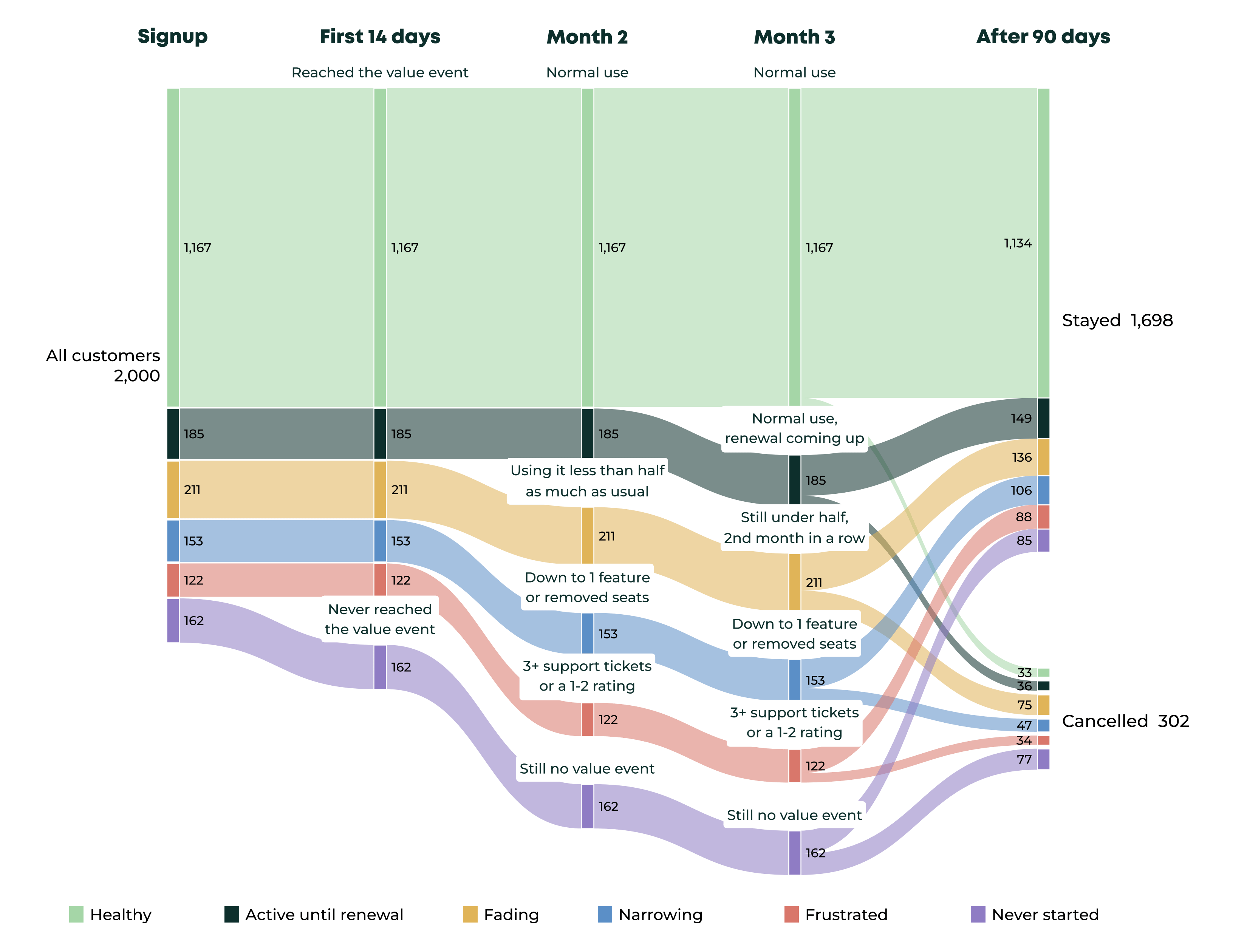
How to read it: all 2,000 customers start on the left. Each colour is a road, named in the legend under the chart. Read it left to right: the label on each block is what the data showed at that moment, and the number is how many customers were there. At the end, every road splits between customers who stayed and customers who cancelled. The purple road (Never started) loses almost half its customers; the light green one (Healthy) loses very few. The thin light green band crossing from the top is churn that no signal predicted.
Now meet one customer from each road, and what to do about each one.
1. Never started (purple)
The first customer logged in once in their last month and never reached the value event. They didn’t leave the product. They never really arrived.
This is the road the cohort curve shows as a month-one cliff. Seen customer by customer, it’s simple to spot: no value event after the first two weeks.
What to do:
Find where they stopped, not just that they stopped. Map the steps between signup and the value event and see where these customers stall. Blocked on setup (an integration, a data import) needs a different fix than never coming back after day one.
Check who signed up. In B2B, the person who buys is often not the person who will use the product. If the account has one login and no invites, ask who should be using it and get them in.
Remove the blocker, don’t just remind. Templates, sample data, a pre-built first report: anything that gets them to the first result without doing the setup themselves.
Watch: the share of new customers reaching the value event within 14 days.
2. Fading (yellow)
The second customer reached value, used five features, and then slowly went quiet: 3 sessions last month, against their own average of 13.
The word that matters is own. Against the whole customer base, 3 sessions might look normal. Against this customer’s history, it’s a drop of more than three quarters.
What to do:
Look at who faded, not just the account. If one main user went quiet and everyone else is unchanged, your champion may have left or changed role. Re-onboard whoever took their place, before they decide they don’t need the tool.
Look at what faded. Which feature or workflow stopped first? A drop in one workflow often means a process changed on their side, or a competitor took over that job.
Send value, not reminders. A “we miss you” email rarely works. A short summary of what the product did for them, or a scheduled report that lands in their inbox, brings the value to them without asking for a login.
Watch: how many Fading customers get back above half of their own average within 30 days.
3. Narrowing (blue)
The third customer still logged in six times a month. But they used one feature out of five, and they had just cut 4 of their 10 seats.
This customer is shrinking the product down to the one thing they still need, which is also the moment a cheaper tool starts to look good enough.
What to do:
Ask at the moment it happens. When someone removes seats or downgrades, one in-product question (”What changed?”) tells you more than any dashboard: budget cut, team shrank, or another tool took over.
Show what they’ve stopped using, with their own data. Not a feature tour, but what those features did for them last quarter, in numbers they recognise.
Right-size before they shop around. If they genuinely need less, offer the smaller plan yourself. A downgrade keeps the customer, the data and the chance to grow again; a cancellation doesn’t.
Watch: among Narrowing customers, how many downgrade instead of cancelling.
4. Frustrated (red)
The fourth customer used the product normally and opened six support tickets in three months.
Usage alone would never flag them. Their problem wasn’t value. It was friction.
What to do:
Set an escalation rule. The third ticket in 90 days moves the account to a senior person who owns it until it’s solved, instead of starting from zero with a new agent each time.
Tag the tickets: bug, missing feature, or “how do I”. Each needs a different owner: engineering, product, or better onboarding and docs.
Close the loop. When the fix ships, tell every customer who reported it. Many teams fix the problem and never go back, so the customer still remembers the product as broken.
Watch: cancellations among customers with 3+ tickets, and the rating they give after the fix.
5. Active until renewal (dark green)
The fifth customer is the uncomfortable one. Usage at 100% of their own average, a couple of features, one ticket. Then a renewal came up, and they left.
In the example data, healthy-looking customers with a renewal in the next 90 days cancelled at 19%. Healthy customers without one cancelled at 3%. Usage-based health scores miss this road by design, because nothing in usage changes. What changes is that someone has to decide whether the invoice is worth paying.
What to do:
Build the renewal case 60–90 days before. A recap of what the product did for them, in their own numbers, sent to the person who signs the invoice. That person often never logs in.
Check what changed on their side. A new budget owner, a project that ended, a cost review. Each one is a renewal risk even when usage is perfect.
Offer a way to stay that isn’t the full price. For customers who use the product in projects or seasons, a pause or a smaller plan beats losing them for good.
Watch: renewal rate for customers who got these moves (the recap, a smaller plan or a pause), against a holdout who didn’t.
Is the road real? The check most teams skip
Here’s the step that separates an analysis from a list of hunches.
Take any sign, say “logged in less than last month”. Plenty of customers who cancelled will have it, and that feels like proof. It isn’t, until you check how many customers who stayed have it too.
A few lines of Python do the whole thing: they put each customer on a road, in order, and compare customers who cancelled with customers who stayed. The full code is in the appendix at the bottom.
Here is the check on the example customers from the chart. For comparison, I added one more row: a simple rule many teams use, “fewer sessions than last month”.
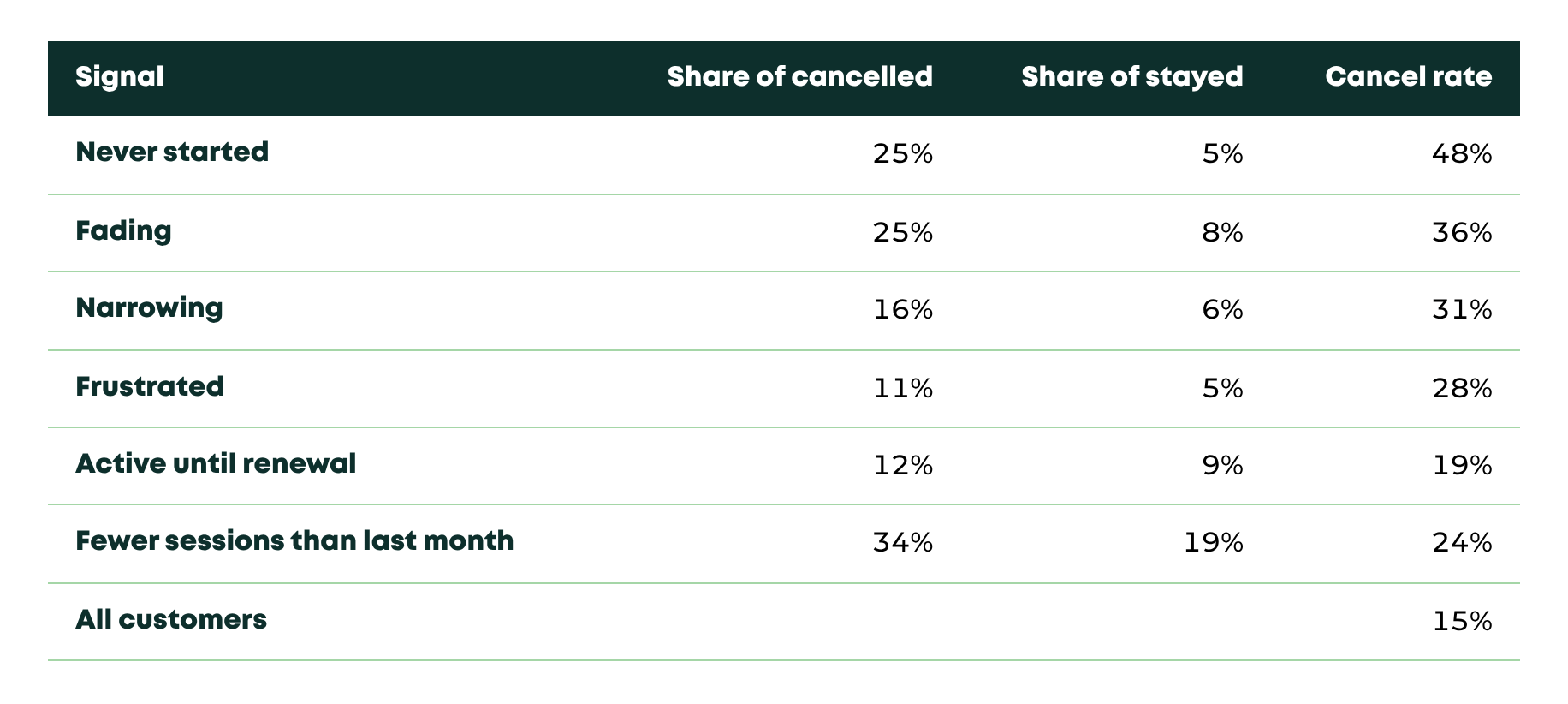
What it says: a quarter of the customers who cancelled were on the Never started road, against 5% of those who stayed. Almost half the customers on that road cancelled, three times the 15% average.
Now that simple rule. “Fewer sessions than last month” catches 34% of cancellations, more than any single road. But 19% of the customers who stayed have it too. Of every four customers it flags, three stay: a quiet summer month, a holiday, a busy quarter.
That’s why the Fading rule asks for two months in a row, below the customer’s own average. One quiet month is noise. Two months below half your own normal is a road.
Two honest limits. About one cancellation in nine in the example came from customers on no road at all: some churn gives no warning. And everything here is correlation. A road tells you who to look at. It doesn’t tell you what will work.
From the customers you lost to the ones you still have
The customers who already cancelled are your teaching data. They show you which roads exist in your business and which signs are real there.
The payoff comes next: run the same function every week on your active customers. Each one lands on a road, and each road has an owner and a plan. Product takes Never started. CS takes Fading and Frustrated. CS or Sales take Narrowing and renewals.
Small numbers? With fewer than about 50 cancellations a year, skip the code. Read your last 20 cancellations one by one and put each on a road by hand. You’ll learn most of what the table would tell you.
Did it work, and was it worth it?
An intervention only counts if you can show it changed something. For each road, randomly leave 10–20% of the customers untouched and compare cancellations after 90 days. Say 100 customers land on Fading this month. Pick 15 at random and leave them alone; the other 85 get the playbook. If 30% of the untouched group cancels and only 20% of the others does, the playbook is worth about 10 points. With groups this small, one or two customers can swing the result, so pool a few months before you trust it. Without that holdout, every “save” also counts customers who would have stayed anyway, and comparing this quarter with last quarter won’t fix it: seasons, prices and channels move churn on their own.
What it can be worth, as an illustrative calculation: a SaaS with 1,000 customers at $150 MRR loses 150 of them in a quarter, as in the example. A quarter of those were Fading, about 37 customers. If the playbook for that road keeps one in five (an assumption the holdout has to confirm), that’s about 7 customers, or roughly $1,000 MRR kept every quarter from one road. Over a year, about $4,000 MRR, close to $50,000 ARR.
The formula: cancellations × share on the road × share you keep × MRR per customer.
Let the data pick your first road
Don’t guess which road your customers take. You can’t know until you look, and the answer is often not the one the team expects.
Tag the last 90 days of cancellations. Run the check. Drop any sign that doesn’t separate customers who leave from customers who stay. Then start with the road that carries the most revenue in your own data, give it an owner and the steps above, and keep a holdout.
Five roads. One table. One road at a time.
Most customers tell you they’re leaving long before they click cancel. They just don’t tell you in words.
♻️ Keep customers longer.
Before you go: which road do most of your cancellations take? Reply with its name: one word is enough.
Antonio
Appendix: the full code
What this code does: it builds an example table of 2,000 customers, puts each one on a road and runs the check from “Is the road real?”. The data is random, so the numbers come out similar to the table above, not identical. To use it on your own customers, replace the example table with one row per customer built from your event log.
import numpy as np
import pandas as pd

# A synthetic customer table, so the example runs as is.
# In real life: one row per customer, built from your event log
# (the 90 days before they cancelled, or the last 90 days if they stayed).
rng = np.random.default_rng(7)
n = 2000
kind = rng.choice(["healthy", "never", "fading", "narrowing", "frustrated", "renewal"],
                  size=n, p=[.62, .08, .11, .08, .06, .05])
avg = rng.gamma(4, 3, n).round() + 2                       # the customer's own normal
df = pd.DataFrame({
    "reached_value_event":        kind != "never",
    "avg_sessions_first_60d":     avg,
    "sessions_last_2_months_max": np.where(kind == "fading", avg * rng.uniform(.1, .45, n),
                                           avg * rng.uniform(.6, 1.3, n)).round(),
    "features_at_start":          rng.integers(2, 6, n),
    "features_now":               np.where(kind == "narrowing", 1, rng.integers(2, 6, n)),
    "seats_removed":              (kind == "narrowing") & (rng.random(n) < .5),
    "tickets_90d":                np.where(kind == "frustrated", rng.integers(3, 8, n), rng.poisson(.4, n)),
    "min_rating_90d":             np.where(kind == "frustrated", rng.integers(1, 3, n), rng.integers(3, 6, n)),
    "renewal_within_90d":         (kind == "renewal") | (rng.random(n) < .06),
})
risk = {"healthy": .03, "never": .45, "fading": .35, "narrowing": .3, "frustrated": .3, "renewal": .4}
df["cancelled"] = rng.random(n) < pd.Series(kind).map(risk).to_numpy()

def road(c):
    if not c.reached_value_event:                         return "Never started"
    if c.tickets_90d >= 3 or c.min_rating_90d <= 2:       return "Frustrated"
    if (c.features_now <= 1 and c.features_at_start >= 3) or c.seats_removed:
                                                          return "Narrowing"
    if c.sessions_last_2_months_max < 0.5 * c.avg_sessions_first_60d:
                                                          return "Fading"
    if c.renewal_within_90d:                              return "Active until renewal"
    return "Healthy"

df["road"] = df.apply(road, axis=1)

# The check: how common is each road among customers who cancelled vs. customers who stayed?
check = pd.crosstab(df.road, df.cancelled, normalize="columns").mul(100).round()
check.columns = ["% of stayed", "% of cancelled"]
check["cancel rate %"] = df.groupby("road").cancelled.mean().mul(100).round()
print(check.sort_values("cancel rate %", ascending=False))